Showing posts with label sql server tips. Show all posts

Tuesday, October 14, 2014

Reduce Complexity in Separate Building Blocks Using SQL CTE

There are many queries and logic in the minds which concerns only one thing that how to make code manageable and easy readable which reduces the building blocks complexities.  But to accomplish it CTE is the best option by which you can easily read as well as manage SQL Server database query.  CTE is defined as Common Table Expression which is a derived table to define and stored for the duration of query. It is very useful for recursive queries, same query contain multiple table reference as well as in User Defined Functions, Stored Procedures, Triggers and Views.


Well Common Expression Table is supposed to be a result set temporary which can be put in a scope of SELECT, INSERT, UPDATE, DELETE, or CREATE VIEW statement.

Here the below scripts manipulate the employees service years in the database name Exotic and result set returns value in descending order.

with Emp_CTE (LoginID , JobTitle , OrgLevel , Years_Employeed )
as
 (  SELECT
               LoginID, JobTitle, OrganizationLevel, datediff(year , HireDate , getdate())
   FROM [AdventureWorks2008R2].[HumanResources] .[Employee]
  )
  select *   from Emp_CTE
order by Years_Employeed desc;

It is very useful for a numerous work like: 

  1. Recursive query can also be created
  2. Doesn’t require to store metadata definition because it provide substitute for a view when the general use of a view is not required.
  3. Enable grouping by a column which is derived from a scalar subselect, or a function that is either not deterministic or has external access.
  4. Reference the resulting table multiple times in the same statement.

The Structure of CTE depends on expression name, an optional column list, and a query defining the CTE. On defining CTE, it can be referenced like a table or view can in a SELECT, INSERT, UPDATE, or DELETE statement. A CTE can also be used in a CREATE VIEW statement as part of its defining SELECT statement.
Systax  forcretaing CTE is:

WITH expression_name[ (column_name [,...xx] ) ]
AS
( CTE_query_definition )

The list of column names is optional only if distinct names for all resulting columns are supplied in the query definition.

The statement to run the CTE is:

SELECT <column_list>
FROM expression_name;

Example

Here is example which shows the components of the CTE structure: 

1.Expression name,
2.Column list,
3.Query. 

The CTE expression Cmpy_CTE has three columns (PersonID, OrderID, and Orderinfo) and is defined as the total number of sales orders per year for each salesperson. 

Transact-SQL
USE AdventureWorks2008R2;
GO
-- Define the CTE expression name and column list.
WITH Cmpy_CTE (PersonID,OrderID, Year)
AS
-- Define the CTE query.
(
    SELECT PersonID, OrderID, YEAR(OrderDate) AS CmpyYear
    FROM Cmpy.OrderHeader
    WHERE PersonID IS NOT NULL
)
-- Define the outer query referencing the CTE name.
SELECT PersonID, COUNT(OrderID) AS TotalCmpy, CmpyYear
FROM Cmpy_CTE
GROUP BY CmpyYear, PersonID
ORDER BY PersonID, Year;
GO
 
Here is a partial result set:


PersonID  TotalCmpy CmpyYear
274 4 2011
274 20 2012
274 14 2013
274 10 2014
275 56 2015
275 139 2016
275 169 2017

Another Sample of Query:

Sunday, September 28, 2014

Easily attach SQL database to the SQL Server in Few Clicks

To attach SQL database to the Server there are many way but here we discuss on easy way which saves time as well as your extra effort. Byoptimizing SQL Server Management Studio you can tremendously attach SQL database MDF file, LDF file to the SQL Server environment.

Step1: Firstly click on SSMS and then open Database Engine by filling all credential details.


Step2: Then make a click on SQL object explorer and go to database


Step3: Then make a right a right clicks on Database 

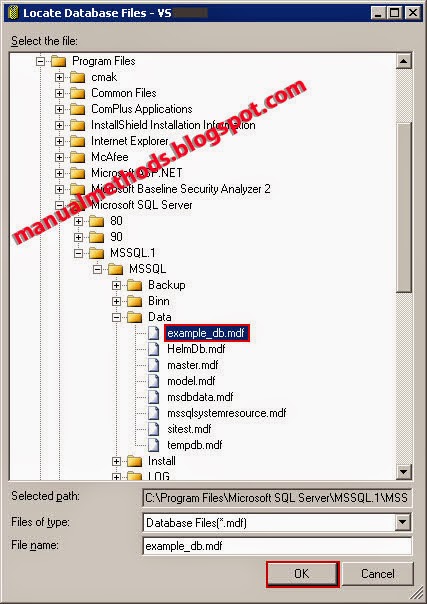
Step4: Select Attach and click on ADD Button and browse the database MDF file


Step5: On Selecting MDF File just go to Ok to complete the job

 
Step6: You can also attach SQL MDF file without LDF File by removing it after selecting MDF file also.


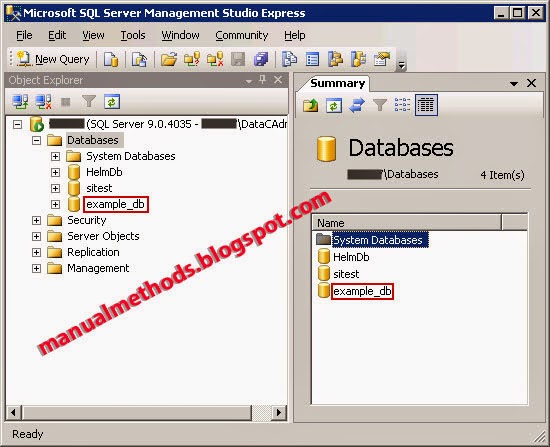
Step7: Check your attached database in a list of Database


Another Approach to attach a database by using T-SQLQuery


  1. Establish a connection with Database Engine.
  2. Just click on New Query.
  3. Type in New Query Window the below statement with For Attach close i.e
  4. CREATE DATABASE statement with the FOR ATTACH close. For example
CREATE DATABASE Mypersonalwork
    ON (FILENAME = 'C:\MSSQLServer\Mypersonalwork.mdf'), 
    (FILENAME = 'C:\MSSQLServer\Mypersonalwork_Log.ldf') 
    FOR ATTACH; 
      
Note:
You may also go with sp_attach_db or sp_attach_single_file_db stored procedure. But in future version of Microsoft SQL Server these procedures will be removed. So you must apply this approach which serves a better way to attach SQL MDF Files quickly.

Friday, September 26, 2014

Steps to Convert nvarchar to int Impeccably in SQL Server

Mostly many of the users of SQL database faces problems when they need to convert  nvarchar to int. In the SQL Server database there is no provision or no option is available to execute such task. But in this section we provide you a simple way by which you can convert nvarchar  to Int . For this process, you need to follow few steps which help to convert nvarchar to int.

Suppose you have an amount column lock

30,000.00
-74,000.00
45,000.00

It's data type is nvarchar.

When you try to convert this into Int, it does not work. If you used  to replace to get rid of ','.
And when I check the values using is numeric, every record returns 1.  In order to resolve this try converting to decimal and then to end.Or trimming off the .00 at the end of each string.  Try the below queries which helps you to convert nvarchar to int

Converting first twodecimals and then that decimal to integer for example:
DECLARE @Numb AS VARCHAR(50)
SET @Numb = '-45,000.00'

SELECT CAST(CAST(REPLACE(@Numb,',','') AS DECIMAL(10,2)) AS INT)

But be careful as:
DECLARE @Numb AS VARCHAR(50)
SET @Numb = '-45,000.99'
SELECT CAST(CAST(REPLACE(@Numb,',','') AS DECIMAL(10,2)) AS INT)

Truncates the input value, that is -45,000.00 and -45,000.99 both return an integer value of -74000

Here are some other  options which helps in conversion .
  • CBool—Converts a value to a Boolean data type.
  • CDate—Converts a value to a Date data type.
  • CInt—Converts a value to an Integer data type.
  • CStr—Converts a value to a String data type.
  • CVar—Converts a value to a Variant data type.
Syntax
  • CBool(expression)
  • CByte(expression)
  • CCur(expression)
  • CDate(expression)
  • CDbl(expression)
  • CDec(expression)
  • CInt(expression)
  • CLng(expression)
  • CSng(expression)
  • CStr(expression)
  • CVar(expression)
Converting to an Integer Data Type

TheCInt function takes a numeric or string value and converts it to an Integer data type. The argument is required and needs to represent a value within the range of -32,678 to 32,767. If the argument contains a decimal, Access rounds to the next whole number. A value of .5 or higher is rounded up; anything lower is rounded down. Some examples of CInt functions follow:

Dim MyDouble, MyInt
MyDouble = 2345.5678    ' MyDouble is a Double.
MyInt = CInt(MyDouble)    ' MyInt contains 2346.

IN SQL, you could use CAST.

SELECT
CAST([Column] AS INT) AS [Column Name]
FROM [Table]
WHERE ...

Or, if you wanted to SUM off the SQL query.

SUM(CAST([Column] AS INT)) AS [Column Name]


The above methods are sophisticated to use for covertingnvarchar to int as well as other data types.


Perhaps you should store the data in SQL Server as an INT field, instead of a VARCHAR(255) field?
If you did that, you wouldn't need to make any conversions in Access.

Having said that, if you don't want to make changes to the SQL Server database, you can use VB's CInt(field) in Access queries to convert numbers stored as a string into integers. Be aware this approach will fail if there are any non-numeric values stored in the varchar field.


I don't want to make any changes from SQL side.Only from access side