Showing posts with label pdf. Show all posts

Wednesday, January 20, 2016

How to Create or Insert Watermark in Adobe PDF Documents

Use Adobe Acrobat or online PDF watermark creator tool to insert watermark to PDF files. Read this article to make sure how to add watermark in PDF documents for free.

How to Add Watermark in PDF Files is Explained Here

Inserting a watermark to PDF documents is the easiest way to avoid content delicacy from unlawful copying or plagiarism text. A PDF watermark is also useful for branding purposes to show the brand name with all your documents. Apart from that you can create watermark on PDF document for copyright.

So if you are not unaware about how to add watermark in PDF files, then this post will provide you a step by step procedure to insert watermark to PDF files with the help of using Adobe Acrobat 9 or XI Pro. You can also use a PDF watermark tool to create watermark on PDF documents. Both of the methods are elaborated below.

Add Watermark in PDF Files by Using Adobe Acrobat 9 Pro or XI

Creating watermarks or PDF stamp for your required PDF documents is easy with the help of Adobe Acrobat 9 or XI Pro. You can simply add, update, or remove watermark PDF files as shown in below steps:

1) In the very first step, open your PDF file and move to View >> Tools >> Pages.

Tuesday, September 15, 2015

Easy Methods to Split a Large PDF file into Multiple Pages

Earlier I was wondering for a free PDF split solution to split a large (approx. 15 MB) containing 50+ pages. I have spent my several hours to find out a suitable online PDF file splitter application. Along with the tool, I also noticed a lot of other similar tools and techniques which will make sure how to split a large PDF file into multiple pages.


I know that this is a common requirement to break a PDF file into parts to manage the files or share specific content of PDF file with friends and team members. So if you are also searching an online PDF split tool or other techniques to divide PDF file into manageable size of PDF files then this article will full fill all your needs. Here I am going to elaborate self-analyzed methods and tools for splitting a large PDF file into individual pages. 

Monday, September 29, 2014

How to Convert a Word Document to PDF in Office 2007?


PDF is a portable document file preferred by most of professionals for security and compatibility reasons. How to convert a word document to PDF in Office 2007 becomes a common query for that user start wondering free or paid solutions for the task. It is very simple to save word 2007 document to PDF file using free add-ons provided by Microsoft.

Get straight instructions to explore how to convert a word document to PDF in Office 2007 without doing more efforts. This method can be used in all Windows based computers and support Windows XP, 7, 8 and 8.1 etc.

Note: Internet connection is required for only one time to download and install a free add-ins provided by Microsoft.

Required Steps with related Snap Shots!

Step1: Open Word file that you want to convert into PDF file


Step2: Click the Office button >> Save As >> Find Add-ins for other file formats


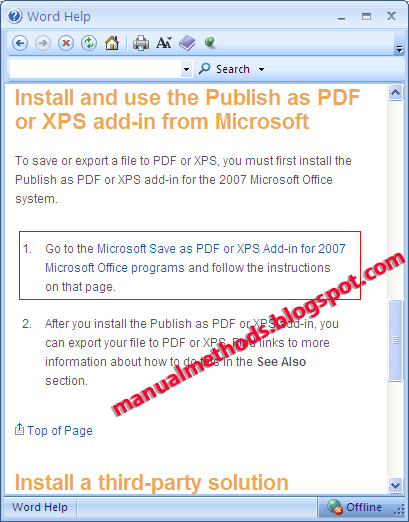
Step3: Click link (Install and use the Publish as PDF or XPS add-in from Microsoft)


Step4: Now click the first option (Microsoft Save as PDF or XPS Add-in for 2007 Microsoft Office programs)


Step5: Now an online tab (Microsoft Download Window) will be open >> Click the Download button
Install Add-ins after finishing downloading


Step6: Now click again to Office button >> Save As >> pdf or xps


In this way you can simply save word file to PDF. Yet you have any query then comment here I will try to solve it as soon as possible.